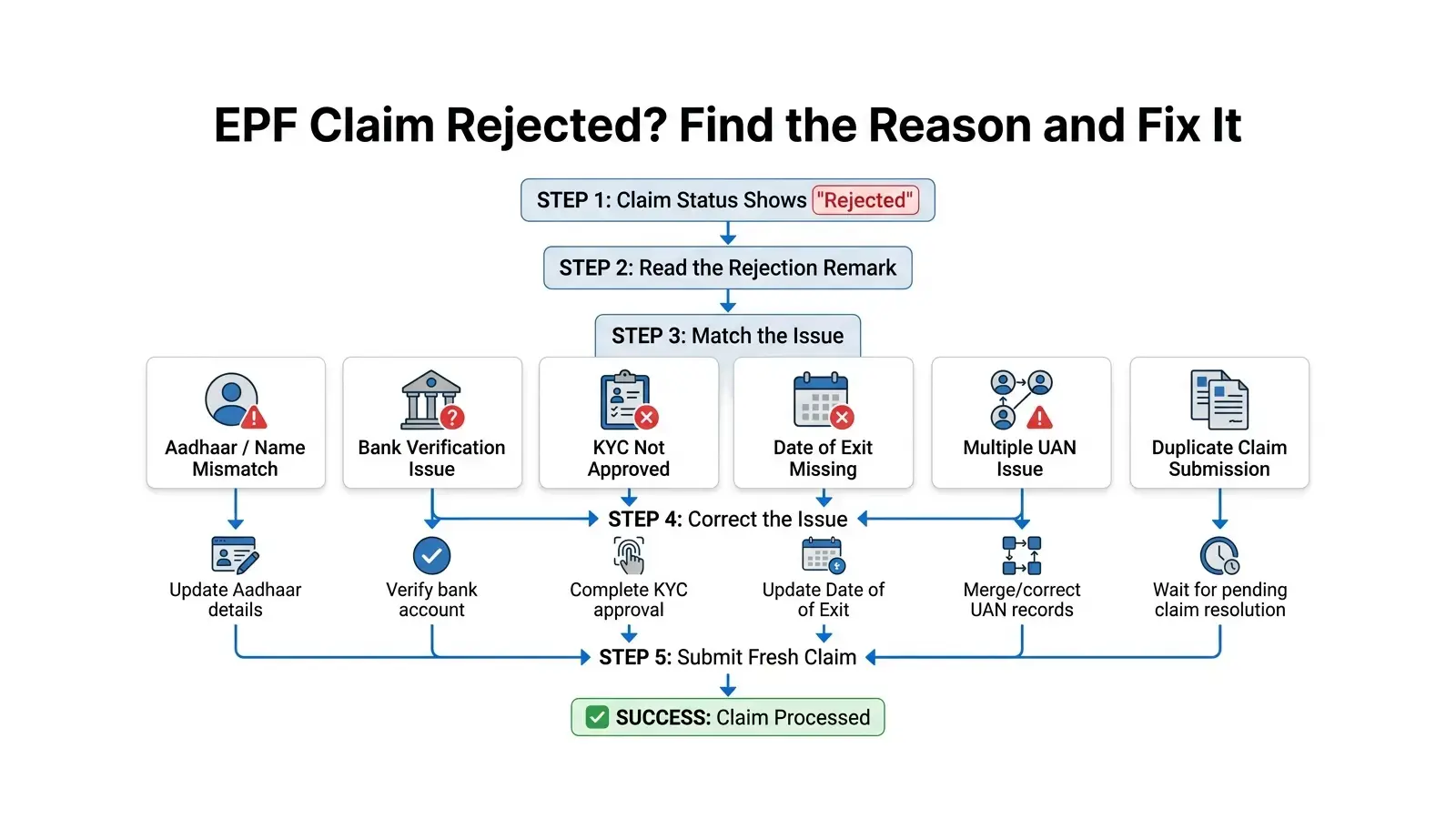
You filed your EPF claim, and instead of a credit to your bank account, you got a rejection. No phone call, no explanation beyond a short remark on the portal. This happens to a lot of people, and most of the time the reason is something small and fixable — not a sign that your money is stuck or lost.
This guide walks through the nine reasons EPFO actually rejects claims, how to confirm which one applies to you, and what to do about each one.
Quick Answer
EPF claims get rejected mainly because of data mismatches between your UAN record and other official IDs — most often your name, Date of Exit, bank details, or KYC not matching across Aadhaar, PAN, and your employer's records. EPFO's system cross-checks every field automatically, and even a small spelling difference, an unapproved KYC document, or a missing Date of Exit entry is enough to stop a claim. Most of these rejections are fixable without starting the claim over from scratch.
Key Takeaways
- Most EPF claim rejections come from data mismatch, not eligibility problems.
- The exact rejection reason is shown in the "Track Claim Status" remarks on the member portal — check this first before doing anything else.
- Name mismatch between Aadhaar and EPFO records is one of the most common rejection causes.
- KYC must show "Digitally approved by the employer" before a claim can go through — "Pending for Approval" is not enough.
- Date of Exit has to be entered before a final settlement (Form 19) claim will process.
- You can self-update Date of Exit through the member portal if it has been at least two months since your last contribution and your UAN is Aadhaar-verified — no employer approval needed for this specific update.
- If your employer is not responding to a KYC or verification request, EPFiGMS (epfigms.gov.in) is the official escalation route.
- A rejected claim almost never means you lose your EPF balance — it stays in your account until you refile correctly.
Important Terms, Defined Plainly
UAN (Universal Account Number) — A 12-digit number EPFO assigns to every member. It links all your EPF accounts across different employers under one number. You activate it once and use the same UAN for life, regardless of how many jobs you change.
KYC (Know Your Customer) — The one-time process of linking your Aadhaar, PAN, and bank account to your UAN so EPFO can verify your identity for online services. KYC details you enter yourself stay in "Pending for Approval" status until your employer digitally signs off on them.
Date of Exit — The last working day recorded against a specific employer in your EPF service record. It's entered either by the employer through their portal, or by you directly if two months have passed since your last contribution and certain conditions are met. Final settlement claims cannot be processed without it.
EPF Claim Status — The real-time status of your submitted claim, visible under "Track Claim Status" on the member portal. It shows whether the claim is pending with the employer, pending with EPFO, settled, or rejected — along with a remarks field explaining why, if rejected.
Common EPF Rejection Reasons at a Glance
| # | Reason | Who Usually Causes It |
|---|
| 1 | Name mismatch (Aadhaar vs EPFO records) | Data entry error by employer or member |
| 2 | Bank account verification failure | Member (wrong IFSC, inactive account) |
| 3 | Date of Exit not updated | Employer, or member if eligible to self-update |
| 4 | KYC not approved | Employer not digitally signing off |
| 5 | Employer verification pending | Employer inaction |
| 6 | Multiple UAN issues | ECR filing error by an employer |
| 7 | Claim already under process | Member submitting a duplicate claim before the first is resolved |
| 8 | Incomplete service history | Missing employer ECR data |
| 9 | Document or technical verification failure | Signature mismatch, illegible scan, portal error |
Reason #1: Name Mismatch Between Aadhaar and EPFO Records
What it means
The name on your EPF account (as entered by an employer at some point) does not exactly match the name on your Aadhaar card. This includes spelling differences, missing middle names, initials versus full names, or extra spaces.
Why EPFO rejects the claim
KYC verification depends on an exact match between Aadhaar and UAN records. Because the check is automated rather than manual, even a minor spelling difference or a missing surname is enough to flag a mismatch.
How to check it
Log in to the Unified Member Portal and compare the name shown on your profile against your Aadhaar card exactly, letter by letter.
How to fix it
Go to Manage → Modify Basic Details on the member portal. Enter your name and date of birth exactly as they appear on Aadhaar, then submit. This generates a name change request that your employer needs to digitally approve. If your name has changed for a different reason (marriage, legal name change), you may need to submit supporting documents as guided on the portal.
Reason #2: Bank Account Verification Failure
What it means
The bank account linked to your UAN either has incorrect details (account number or IFSC code), is inactive, or was changed while a claim was already in process.
Why EPFO rejects the claim
EPFO needs to verify the seeded bank account before crediting your withdrawal. If the account number and IFSC don't resolve to a valid, active account, or if you changed your bank details mid-claim, the claim is rejected rather than risking a failed transfer.
How to check it
Under Manage → KYC on the member portal, check whether your bank account shows as approved and verified, or still pending.
How to fix it
Re-enter your bank account number and IFSC code carefully under KYC. Use an account where you're either the sole holder or a joint holder with your spouse, and make sure the account's maximum balance limit can actually hold the amount you're withdrawing. Once submitted, your employer needs to digitally approve the updated bank details before the account is seeded. One thing to watch for — don't change your bank account details while a claim is already pending with EPFO; that alone can trigger a rejection.
Reason #3: Date of Exit Not Updated
What it means
Your record does not show a Date of Exit for your previous employer, even though you have actually left that job.
Why EPFO rejects the claim
A final settlement claim (Form 19) is processed against a confirmed service-end date. Without it, EPFO cannot calculate your eligible withdrawal amount or confirm you're no longer an active employee at that establishment.
How to check it
On the Unified Member Portal, go to Manage → Mark Exit, and check whether a Date of Exit is already recorded for the relevant PF account.
How to fix it
If your employer has not entered it, and at least two months have passed since your last contribution, you can self-update it: go to Manage → Mark Exit, select the PF account number, enter the date and reason for exit, and verify with the OTP sent to your Aadhaar-linked mobile number. This does not require employer approval.
Reason #4: KYC Not Approved
This is the one that sits unresolved the longest, usually not out of anyone's bad intent — it's just rarely the most urgent item on an HR team's desk.
Entering your Aadhaar, PAN, or bank details under KYC on the member portal is only half the process. Until your employer digitally signs off on them, those details sit in "Pending for Approval," and a claim filed in that state has nothing employer-verified to match against, so it won't go through.
You can see exactly where things stand under Manage → KYC. Each document shows one of three states: "Pending for Approval," "Digitally approved by the employer," or — for Aadhaar specifically — "Verified by UIDAI" once UIDAI itself confirms the match.
If KYC continues to show "Pending for Approval", follow up with your employer's HR or payroll team to verify whether approval action is still pending. Give it a reasonable amount of time, and if nothing moves, take it up the chain internally. When even that doesn't work, EPFiGMS (epfigms.gov.in) is the official route for an unresponsive employer — that's specifically what it's there for.
Reason #5: Employer Verification Pending
What it means
Your claim — particularly a transfer claim or one requiring employer attestation — is sitting with your employer for digital sign-off, and they haven't acted on it.
Why EPFO rejects the claim
Many claim types require the employer to confirm your service and member details before EPFO processes payment. If the employer doesn't attest within a reasonable window, or actively rejects the attestation (citing details not matching establishment records), the claim is rejected at that stage.
How to check it
Track Claim Status will show "Pending with Employer" as the status if this is the holdup.
How to fix it
Reach out to your former employer's HR/payroll team directly with your claim reference number. If they're slow or unresponsive, escalate internally. As a last resort, EPFiGMS lets you file a grievance naming the establishment, which routes the matter through EPFO's own process for unresponsive employers.
Reason #6: Multiple UAN Issues
Sometimes a new employer generates a fresh UAN for you instead of linking the one you already have — it usually happens when a previous employer never filled in your Date of Exit during their return filing, so the system doesn't show you as someone with an existing, active account. Either way, you end up with two UANs holding two halves of your service history, and EPFO has no way of automatically knowing they're the same person. A claim filed against a split record won't settle cleanly.
The giveaway is simple: if your current employer generated a brand-new UAN for you rather than asking for your existing one, that's almost certainly what happened.
Fixing it means looping in two parties at once. Tell your current employer right away, and separately send EPFO an email at uanepf@epfindia.gov.in with both UAN numbers — current and previous. Once they verify the match, the older UAN gets blocked and your active one carries the full service history forward, clearing the way for your claim. The simplest way to avoid this altogether next time you switch jobs: hand your new employer your existing UAN instead of letting them create one.
Reason #7: Claim Already Under Process
What it means
You filed a claim and submitted another claim before the earlier claim was resolved.
Why EPFO rejects the claim
EPFO will not run two versions of the same claim side by side. If a previous claim — physical or online — has already reached EPFO and hasn't been marked rejected, a fresh submission for the same purpose gets turned away rather than processed in parallel.
How to check it
Track Claim Status will show your earlier claim as still active or pending. If you can see it there, a second filing isn't going to speed anything up — it just adds a rejection to your record.
How to fix it
Let the existing claim run its course and follow up on that one specifically rather than filing again. If it's been pending well beyond what seems reasonable, raise it through your employer or EPFiGMS instead of resubmitting.
Reason #8: Incomplete Service History
What it means
Parts of your employment record — joining date, previous member ID, or contribution history with an earlier employer — are missing or not linked correctly in EPFO's database.
Why EPFO rejects the claim
If your previous employer never filed the Electronic Challan cum Return (ECR) with your member ID, or filed it but it hasn't yet been reflected on the portal, EPFO cannot verify your full service period — and your claim depends on that record being complete and accurate.
How to check it
Download your EPF passbook from the member portal and check whether all your previous employments and member IDs appear, with contributions reflected for each period you worked.
How to fix it
If a previous employer's contributions are missing, you'll need to follow up with that employer to confirm they have filed the relevant ECR. If the member ID exists in EPFO's database but is not linking correctly to your UAN, you may need to submit a correction request through your current employer, or, in some cases, apply directly to the EPFO Regional Office handling that account through a joint request.
Reason #9: Document or Technical Verification Failure
What it means
This covers a mix of issues — your signature on a physical claim form not matching office records, an illegible uploaded document, or a portal-side technical error during submission.
Why EPFO rejects the claim
For claims that still need physical or scanned attestation, signature checks happen against whatever EPFO already has on file — and a genuine mismatch, not just a slightly different signing style on the day, gets flagged. The same applies to documents that simply can't be read clearly enough to verify.
How to check it
The remarks field in Track Claim Status will usually flag this directly, often as a signature mismatch or a documentation issue.
How to fix it
If it's a signature mismatch, sign your physical form exactly as you signed your original employment or KYC documents, or contact EPFO to update the signature on record if it has genuinely changed over time. For digital claims, most EPFO services no longer require document upload at all — only the document name and number need to be specified — so a technical failure during online submission is usually best resolved by simply resubmitting after checking your internet connection and browser, or trying again after a short wait if the portal was under load.
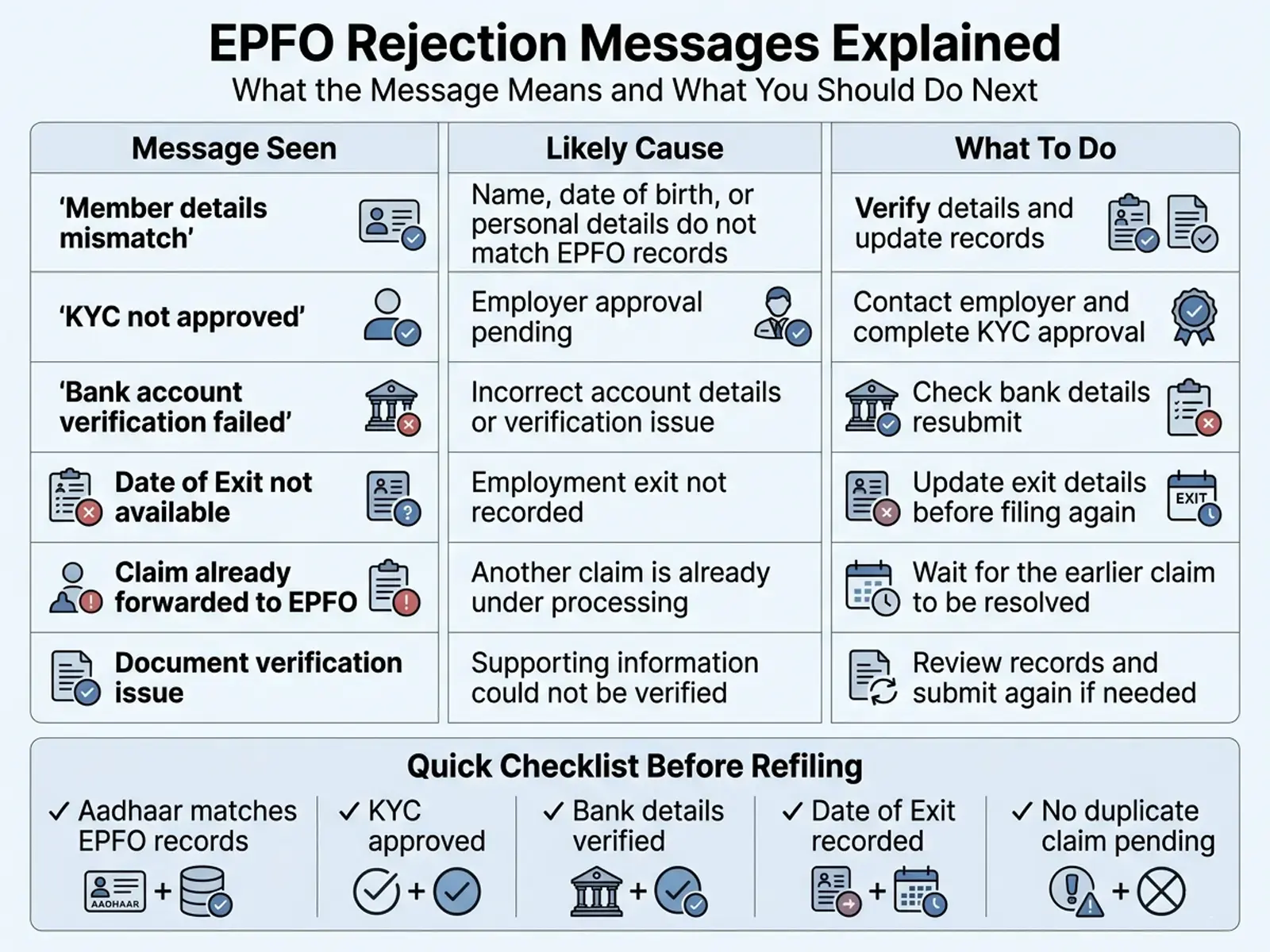
Actual EPFO Rejection Messages and What They Mean
| Message Seen | Likely Cause | Recommended Fix |
|---|
| Member details do not match with establishment records | Name, DOB, or other field differs between your UAN profile and what your employer has on file | Compare your portal profile against your Aadhaar and ask your employer to correct establishment-side records if needed |
| Signature of the member does not match with those available in office records | Physical claim signature differs from the signature EPFO has on file | Resign using your registered signature style, or request a signature update through your employer/EPFO office |
| Claim already forwarded to EPFO and not rejected till date | A duplicate claim was submitted while an earlier one was still in process | Check Track Claim Status before refiling — wait for the existing claim to resolve |
| Signed copy of claim printout not received from member | For transfer claims (Form 13) filed through OTCP, a signed printout was required but not submitted within 15 days of online submission | Submit the signed printout to your employer promptly, or contact the employer's authorised signatory listed under claim status |
| KYC shown as Pending for Approval | Employer has not digitally approved KYC details you submitted | Follow up with HR/payroll; escalate via EPFiGMS if unresponsive |
How to Check EPF Claim Status
Log in to the Unified Member Portal with your UAN and password. Go to the "Track Claim Status" option under the Online Services or Claim section. This shows the current stage of your claim — submitted, pending with employer, pending with EPFO, settled, or rejected — and a remarks column with the specific reason if it was rejected or is delayed.
You can also check basic PF status by sending an SMS with EPFOHO UAN ENG to 7738299899, or with a missed call to 011-22901406 from your UAN-registered mobile number, though detailed rejection remarks are only visible on the portal itself.
EPFO Service Standards and Processing Timelines
EPFO's own Citizens' Charter sets out two numbers for every claim type: the statutory limit under the EPF Scheme, and a faster, aspirational target the organisation has committed to. The statutory limit is 20 days across the board — final settlement, partial withdrawal, transfer, pension claims, all of it.
The Charter's actual targets are quicker than that 20-day ceiling, and they vary by claim type:
- Final settlement (Form 19) and transfer claims (Form 13): 7 working days
- Partial withdrawal (Form 31) for illness or pandemic-related reasons: 3 working days
- Withdrawal by a nominee or survivor (Form 20): 3 working days
- Pension claims (Form 10C, Form 10D): 7 working days
If your claim is running well past these windows with no movement, that's your cue to check the remarks field on Track Claim Status or raise it with EPFO directly rather than just waiting it out.
When to Use the EPFiGMS Grievance Portal
EPFiGMS (epfigms.gov.in) is EPFO's official online grievance system, available to members, employers, and pensioners. Use it when:
- Your employer has not approved KYC or attestation despite repeated follow-up
- Your claim has been stuck well past the normal processing window with no clear remarks
- You've tried resolving a rejection through the usual channel and it hasn't worked
To file a grievance, you'll need your UAN and a clear description of the issue, and you can attach supporting documents if relevant. EPFO's Citizens' Charter commits to a 7-working-day target for resolving grievances raised through this route.
Before escalating anywhere else, contact your employer's HR or payroll team directly if your rejection involves:
- KYC sitting in "Pending for Approval" status
- Date of Exit not entered (and you don't yet qualify to self-update it)
- Employer attestation pending on a transfer or settlement claim
- A name, date of birth, or service record mismatch that originates from what the employer submitted
Most of these issues are resolved faster through direct employer follow-up than through a grievance, simply because the employer is the party that needs to act. Escalate through EPFiGMS only after you've made a genuine attempt to resolve it with them first.
Common Mistakes to Avoid Before Submitting a Claim
- Filing a duplicate claim while an earlier one is still pending. This itself becomes a rejection reason ("claim already forwarded to EPFO and not rejected till date"). Check Track Claim Status before refiling.
- Changing your bank account while a claim is in process. Bank details cannot be changed during the pendency of any claim — finish or withdraw the existing claim first.
- Submitting before KYC shows as employer-approved, not just "entered" or "pending."
- Assuming Date of Exit is automatically filled. It is not — either your employer enters it, or you self-update it once eligible.
- Letting a new employer generate a fresh UAN instead of declaring your existing one, which creates the multiple-UAN problem.
- Mismatched names across documents. If your Aadhaar, PAN, and EPFO records don't show the exact same name, fix this before filing, not after a rejection.
Where This Connects to the Rest of Your EPF and Salary Planning
A rejected claim is usually a data problem, not a money problem — your balance stays exactly where it is. If you want to check your latest EPF balance before or after refiling, see our guide to checking it via missed call, SMS, UMANG, or the UAN portal. If you're trying to understand what you're actually eligible to withdraw and under what conditions, the EPF Withdrawal Rules guide covers eligibility, the current withdrawal categories, and tax treatment in detail. If you want to estimate your EPF corpus growth over time, the EPF Calculator does that based on your salary and service years.
If you're closer to resignation or retirement and also need to estimate your separate gratuity payout, see the Gratuity guide — gratuity is calculated independently of your EPF balance. And if your basic salary structure itself affects how fast your EPF builds up, the Salary Structure Optimization article explains how the basic-to-CTC ratio drives both EPF contributions and other salary components.
Before Refiling Your EPF Claim
Before submitting a fresh claim, make sure:
☐ Aadhaar details match EPFO records
☐ KYC is digitally approved
☐ Bank account details are correct
☐ Date of Exit is recorded
☐ No duplicate claim is already pending
☐ Only one active UAN exists
☐ Service history appears correctly in your EPF passbook
This simple checklist can prevent many of the most common EPF claim rejections.
Frequently Asked Questions
Does a rejected EPF claim mean I lose my money?
No. Your EPF balance stays in your account exactly as it was. Rejection just means the claim as filed couldn't be processed — you correct the issue and refile.
Can I refile a rejected claim immediately?
Yes, once the underlying issue (name mismatch, KYC, Date of Exit, etc.) is actually fixed and reflects correctly on the portal. Refiling before the fix is confirmed will likely result in the same rejection.
How many times can I refile a rejected EPF claim?
EPFO does not publish a stated limit on the number of refilings, but each one needs to address the actual rejection reason rather than being a repeat submission of the same incorrect details.
Will I be charged anything for refiling a claim?
No. Filing and refiling EPF claims through the member portal is free.
Can my employer reject my claim without telling me why?
Employers select from a fixed set of system reasons when rejecting attestation, such as a details mismatch or signature mismatch — this should be visible in your claim status remarks, even if the employer doesn't separately inform you.
What if my Aadhaar details themselves are wrong, not my EPFO record?
You'll need to correct it through UIDAI directly (the Aadhaar issuing authority), since EPFO's KYC matching depends on the Aadhaar database being accurate first.
Can I check claim status without logging into the portal?
You can check your PF balance via SMS (EPFOHO UAN ENG to 7738299899) or missed call (011-22901406), but detailed rejection remarks require logging into the Unified Member Portal.
What happens if my employer has shut down or is unreachable?
This needs to be raised through EPFiGMS, naming the establishment, so EPFO's own process for unresponsive or non-existent employers can be applied to your claim.
Is there a helpline number for EPF claim issues?
Yes, EPFO's toll-free helpline is 1800-118-005, in addition to the EPFiGMS grievance portal.
Does a claim rejection affect my credit score or any other financial record?
No. An EPF claim rejection is purely an internal administrative status on your EPFO account and has no connection to credit scores or external financial records.
Sources Used
Last Fact Checked: June 21, 2026
This article is for educational purposes only and does not constitute financial or legal advice. EPFO rules and portal processes are updated periodically — always verify current procedures at epfindia.gov.in or with your employer's payroll team before taking action on a claim.